Showing posts with label Website Index. Show all posts

Drive Traffice-with Yahoo Search Engine

Increase Traffic from Yahoo
Yahoo!, the second largest search engine after Google is suppose to be the toughest search engine for webmasters to rank high. Yahoo! search algorithm is very different from Google and this is the reason, a website ranking good in Google may not rank well in Yahoo! In this post, I will explain few tips to get success with Yahoo!, tips to get good amount of traffic from Yahoo search engine. Tips to perform well on Yahoo for your keywords.

Your success with Yahoo is dependent on Yahoo itself. Yahoo provides various tools for webmasters in order to bring them good amount of traffic from Yahoo! search engine. In this post, we will explore all these tools in details.

Yahoo! Publisher NetworkYahoo publisher network helps you to increase the reach of your website to new readers. Here is what you can do with Yahoo! publisher network.
  • Submit your blog or website RSS feed to Yahoo!
  • Allow other users to subscribe your RSS feed in their My Yahoo! pages using Add to MY Yahoo! button.
  • Submit your website to Yahoo!
  • Manage effectively your website with Yahoo! site explorer
Submit RSS feed to Yahoo! :

If you are not aware of RSS feed, refer to the post here. Once you have feed of your blog or website, you can take advantage of one of the world's most popular feed reader "My Yahoo!". Yahoo! has a large feed database and in order to have your website feed in their feed database, you should first login into Yahoo! using your Yahoo! login id and password. Once login, you can follow this page to submit your RSS feed to My Yahoo! page and Yahoo! feed database.

Once your feed is added, Yahoo! will do the rest. Depend on the frequency of your contents update on your website, Yahoo! will check your feed. You can also tell Yahoo! about your latest updates using Ping. The URL for the ping is-

http://ping.feeds.yahoo.com/rss/ping?u=[THE URL of your RSS feed].

In case, you are not aware of Ping, refer to the post here.

Add to MY Yahoo! :

Webmasters can have "Add to MY Yahoo!" button on their blog or website to let others subscribe the feed of your website in their "My Yahoo" webpage. Add to my Yahoo! button is very handy and comes in two style "Long button" and "short button with text" as given below.

Add to My Yahoo!

Add to My Yahoo!
You can click either of the button in order to add the RSS feed of my blog to your My Yahoo! page.

Submit your website to Yahoo :

Yahoo! provides you an option to tell to Yahoo! about your website or you can say a request to Yahoo! to include your website in their search engine. You can find it here http://search.yahoo.com/info/submit.html. In the above link, you will find Yahoo! search submission and Yahoo! directory submission. You can submit your website and website feed to Yahoo! for free.

Mange your website with Yahoo Site Explorer :

Yahoo Site Explorer Yahoo site explorer gives you complete control over your website in Yahoo!. You can track the progress of your website with Yahoo! site explorer. You can see what all pages of your website are there in Yahoo! search index. You can track the internal and external links to your website. Most of the webmaster prefers backlinks calculations of Yahoo! than Google because it shows all your backlinks. If you are not aware of backlinks, refer to the post here.
You can submit and track the feed of your website in Yahoo! site explorer. You can delete the URL that you do not want Yahoo! to index.

If you want to drive traffic to your website from Yahoo!, follow all these steps in order to expose your website to Yahoo! and let Yahoo! throw thousands of readers to your website every day. Make your success with Yahoo!
Very recently Yahoo! launched a new look and feel for Yahoo Site Explorer. You can access it from http://siteexplorer.search.yahoo.com/new

SEO: What is SEO? What is the use of SEO?


What is SEO?

SEO is a acronym used for Search engine optimization. Search engine optimization is a process to improve the quality of website traffic and the volume from search engines for targeted keywords or search ranking. Every search engine such as Google, Yahoo or Live Search has their own search algorithms and Search engine optimization process target these algoritms in order to rank high on search results of these search engines.

What is the use of SEO?

SEO (Search Engine Optimization) is normally used for blasting traffic to your website by ranking high on various search engines for a perticular keyword or a set of keywords. Webmasters use Search Engine Optimization tools to increase the earnings from their website by targeting more visitors everyday for their selected keywords.

Few tips of SEO

1: Create Good and unique content in order to gain multiple visits from internet users.

2: Submit Sitemap to various search engines like Google, Yahoo, MSN and Ask.com.

3: > Use META description Tag to tell search engines more in detail about your webpage.

4: > Target your keywords, use keyword tool, create a good website and participate in social network.

5: Submit articles to article directory like ezinearticles.com and get instant visibility in search engines. Do not publish the same article on every article directory otherwise search engines can penalize you for duplicate contents.

6: Get more and more quality backlinks from high Google Page Rank websites. These websites will help your website to get easily crawled by search engines.

7: Continuously check your website for fault pages, not reachable URL's and other HTML errors to ensure that your contents are search engine friendly.

8: Optimize your website for every search engine, but target a single to take full advantage of it. For example- You can give more attention to Google search engine over Yahoo.

5 Easy Tips to Become a Successful Blogger

I have seen in past that many people just start blogging on anything without a planning and ends with nothing. There is no success without proper planning until you are lucky enough. Here are few points I observed while writing for many years. These points should help new bloggers to do well in the field of blogging.
  • What's your interest?

    This is the very first question you should ask to yourself while going to start writing. The best output will come with the subject you are most interested with. You will be able to do justice with the blog if you write about your interest. Blogging is not an easy job, you need to dig into it to get the best out of it. If something is of your interest, you will dig into it deeper and deeper and that will help you to become good in writing about it.
  • What can you give to your readers?

    That's another very important question you should ask to yourself while entering into blogging. Readers visiting to your blog will be looking for something to take it with them. It could be a nice article, a nice tip, something new or interesting to download. You should always think of giving something to your readers. Each time you are going to write something, just think for a second that what I can give to my readers. This will help building a regular interest between your blog and blog readers.
  • Can your writing create interest among readers?

    That's another point of concern while writing. You should focus on developing interest among your readers towards your blog. This helps in building long lasting relation between blog and its readers. If you are not able to bring interest to your readers, they will not come back to your blog. Revisit to your blog by any reader will depend on how well your writing is. With good writing you can indirectly force them to revisit your blog and they will happily revisit your blog if they found it interesting.
  • Are you learning everyday?

    So you are all set for writing, you did some research about your interest, you know that you can give interesting writing to your readers. Now it’s time for learning. Yes, in every field you will find many successful people who has made his fortune with their sincere efforts, they have given something to the community and people know them for what they do. Your job is to learn the success mantras from such people every single day. More you learn, more you can offer to your readers. Learning is very important for reaching to top in your field.
  • Are you focusing on your objectives?

    I am sure many of us have some objectives associated with the blogging. Some of us just write because writing is their interest and they just want to share good/bad things to rest of the world. There are people who has clear objective in their mind with respect to their blog. You have to focus more and more on your objectives with every other post you make on your blog. Clear focus will help you to achieve your objectives at the earliest.
You too can become a successful blogger. Just put sincere efforts towards your blog, don't try to make fool to your visitors. Provide the things what they are actually looking for. Build a never lasting relation with your readers.

Tips to Make Google Friendly WebPage

Many publishers complain that Google does not index their pages fast or my pages do not rank high in Google or my new pages are not getting index at all. Here is the solution of all these problems. In this post, I am going to tell you 16 quick tips that will help to boost the rankings of your webpage in search engines.
  • Keep the title of webpage not too long and not too short.
  • The title of the webpage should be clean and reflect the contents of webpage.
  • Your targeted keywords should appear in the title of your webpage.
  • Keep your URL short, not too long
  • Like title, keep your targeted keywords in URL.
  • Give a proper META keywords and description tags to your webpage.
  • Always keep META description relevant to the title and contents of your webpage.
  • Avoid excessive use of keywords, also called keyword Stuffing in either title, URL or main text of your webpage. Refer the post.
  • Make sure you did not copy existing contents in your webpage. It may led to Google penalization. Always provide unique contents in your webpage.
  • Do a proper link building in your webpage. Link only with relevant WebPages or websites of yours or others.
  • Do not put too many URL's in your webpage. Normally search engine leave the page which contains too many links.
  • Keep away from any blackhat SEO technique in your webpage.
  • Optimize images used in your webpage to let your webpage load faster.
  • Add proper "alt" and "title" information to each and every image used in your webpage.
  • For Ex.- My Sample Image
  • Keep less number of objects ( flash animations, video clips, music clips) in your webpage.
  • Double check your webpage for any broken link before publishing it.
There are many other factors also involved to rank high on Google. The basic purpose of this post was to tell you the way you can build a Google friendly or you can say search engine friendly Webpage. These tips are applicable to all major search engines such as Yahoo, Live search and Ask.com search. Make sure you follow all these tips before writing your next post.

How to Get Your Website Indexed Fast in Google

Run for Google
Although there is no guarantee that applying any of tips mentioned here or anywhere else in web will let your website indexed in Google fast, but most of the time these tips works as expected.
Google and other search engines such as Yahoo Search, Live Search and Ask.com have their own norms to put any website in its index and sometimes it took so much time for a new website or blog to get indexed.

So here is the question, how can you get your website indexed very fast? Read the complete post to know the answer.

Sitemap Submission:

Google Webmaster
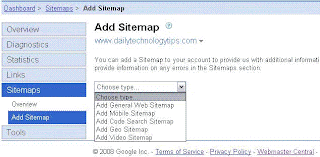
Google provides a service called Google Webmaster for webmasters, where you can track your website progress and many services are provided by Google in order to effectively manage your website or blog. With Google Webmaster, you can submit your blog and website sitemap to Google to get it indexed very fast. To know what is sitemap read this post.

Add URL to Google:

Add URL to Google
Google provides a service to let you send request to Google to include your blog or website URL in search engine index. You need to submit only the top level page of your website. There is no need to submit individual pages. You can add your URL to Google here.

Digg Submission:

Digg Submission
Digg is a very popular web destination to discover and share contents. You can submit your new blog or website to digg. Digg is a high rank website among Google and other search engines.

Comments on Popular Websites and Forum Signatures:


Comment on TechCrunch

Digital Point

There are many websites, blogs and forums on internet which are very popular among search engines and the pages from these websites get indexed very fast by Google and other search engines. TechCrunch, Digital Points, readwriteweb, Boing Boing and lifehacker are few of them. You can leave your comments on these blogs along with your website or blog URL and put your signature with your website URL in these forums. When Google will index these pages, it will also index your website.

Social Networking and Social Bookmarking:

Social networking and Social bookmarking will let your new website and blog get indexed fast by Google and other search engines. These sites are fast crawled by search engines and can boost the chances of your website to get indexed fast.
 

Share

My Blog List

Search

Followers

Technology Copyright © 2009 Blogger Template Designed by Bie Blogger Template