Showing posts with label RSS. Show all posts

What is RSS - Really Simple Syndication?


RSS Definition:

RSS stands for Really Simple Syndication. RSS formats are specified in XML and can be read using any RSS reader or feed reader.

RSS Usage:

RSS mainly used for publishing updated contents like news headlines, latest blog entries etc. You can syndicate your content with RSS.

For example:- Many people may have interest in what you write and they want to get your updated contents without visiting your website or blog. They can subscribe to your RSS and when you will update contents on your blog or website. The latest updated contents will be available to the person who subscribed your RSS using RSS reader.

RSS Tips:

1:-Add RSS subscription option in your webpage on blog to let people subscribe you.

2:-Submit RSS to all major search engines to increase your web traffic.

3:-Submit RSS to RSS directories to get traffic.
How to Add FeedBurner Subscribe Link After Every Post in Blogger

Want to give your readers, a choice to subscribe your blog RSS feed when he visit your blog and found any article useful. You can do that just by adding a feedburner subscription link after every post in blogger. Here in this post, I will explain the way to add subscription link.

Step 1: Go to "Layout" tab and then click "Edit HTML".

Step 2: Click on "Download Full Template" to take a backup of your template before making any changes.

Step 3: Now select "Expand Widget Templates" checkbox and search for the line "" in your blog template.

Step 4: Copy the text given below and paste it just after the line mentioned in step 3.


Step 5: Replace the URL "http://feeds2.feedburner.com/nokia5800downloads" to your blog feedburner URL and replace the text "Nokia 5800 XpressMusic Downloads" to your blog title.

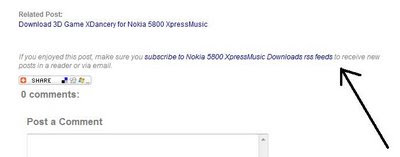
Step 6: Save the template and check. You will see a link after every post as shown in the following image.

Feedburner Subscription


Share

My Blog List

Search

Followers

Technology Copyright © 2009 Blogger Template Designed by Bie Blogger Template